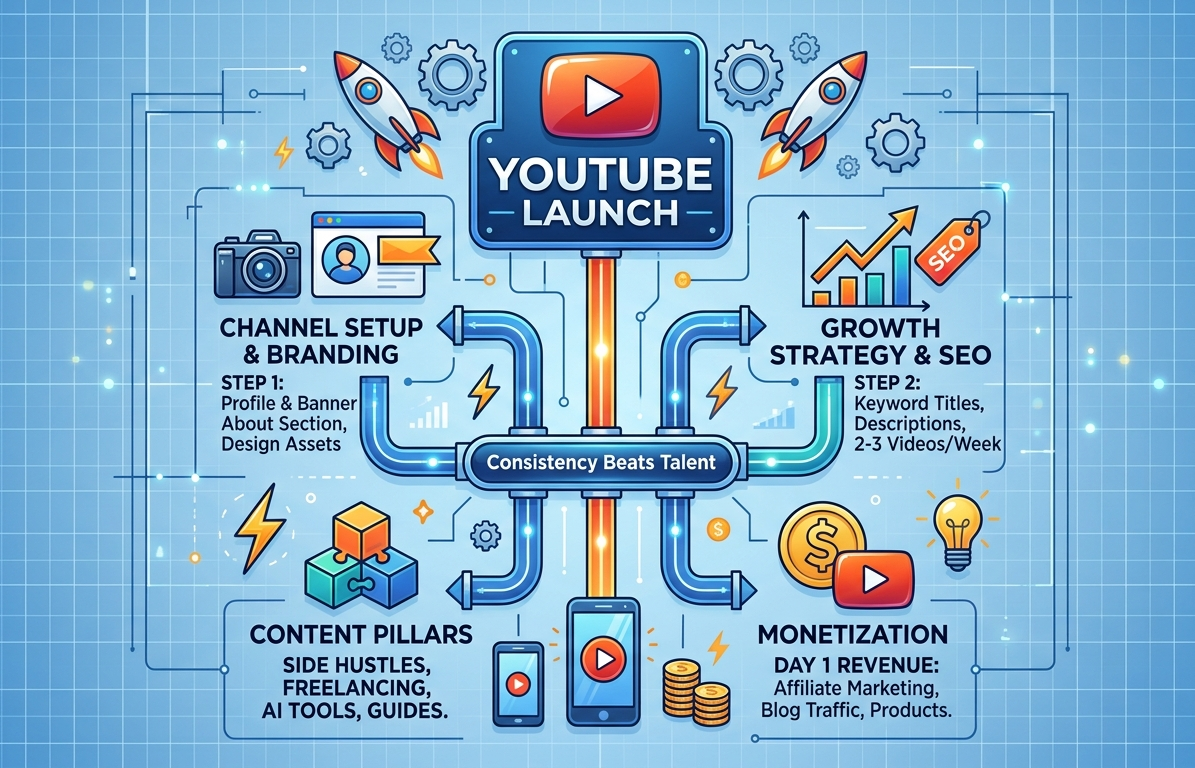
🎨 Phase 1: Channel Creation & Branding
1. Account Setup
- Create a Google Account: Go to google.com/accounts. This will serve as your master YouTube login.
- Launch Your Channel: Visit youtube.com, click your profile icon in the top-right corner, and select “Create a Channel”.
2. Choose Your Identity
- Pick a brandable, niche-related, and memorable name (e.g., GuideBooklet, Side Hustle Lab, EarnSmart).
3. Channel Customization
- Profile Picture: A high-quality logo or a clear headshot.
- Channel Banner: Design a banner optimized for the recommended dimensions: 2560 x 1440 px.
- External Links: Connect your social media accounts and your primary website or blog site.
About Section Copy/Paste Template:
Welcome to the channel! Here, you’ll find simple, practical guides on making money online, side hustles, freelancing, and productivity. Subscribe for weekly tips to help you earn more and grow smarter.
🎯 Phase 2: Niche Selection & Content Creation
Choosing Your Focus
To build an algorithmic footprint, stick to ONE core niche at the beginning. Excellent options for a “guides + finance” channel include:
- 💰 Side Hustles & Gig Work
- 💻 Freelancing & Remote Work Tutorials
- 📱 Paying Apps & Web Platforms
- 📊 AI Tools for Online Income
Your First Video Roadmap
Kickstart your channel with these high-intent searchable topics:
- “Top 5 Side Hustles for Beginners (2026)”
- “How to Make Money Online with Zero Skills”
- “Best Free AI Tools to Earn Money Fast”
🛠️ The Minimalist Tech Stack
You don’t need expensive gear to start. Your smartphone is more than enough. Use these free tools for editing and design:
- Video Editing: CapCut or VN Editor
- Thumbnails & Graphics: Canva
📈 Phase 3: Growth & SEO Optimization
1. Consistent Upload Schedule
Commit to publishing 2–3 videos per week to signal consistency to the YouTube algorithm.
2. Video Optimization (SEO)
Every upload must include these three elements to gain search traction:
- Keyword-Rich Titles: e.g., “How to Make Money Online for Beginners (Step-by-Step)”
- Detailed Descriptions: Explain exactly what the video covers, using relevant keywords naturally.
- Strategic Tags: Input relevant search terms that users type into the search bar.
3. High-Click Thumbnails
Your thumbnail is your first impression. Ensure it has big, bold text (3-5 words max), bright contrasting colors, and a clean, uncluttered design.
💰 Phase 4: Monetization Framework
The YouTube Partner Program (YPP)
- Option 1 (Long-Form Focus): 1,000 Subscribers + 4,000 Watch Hours (last 12 months)
- Option 2 (Shorts Focus): 1,000 Subscribers + 10 Million Shorts Views (last 90 days)
💵 How to Monetize on Day 1 (Before YPP)
You do not need 1,000 subscribers to start earning. Implement these immediately:
- Affiliate Marketing: Recommend tools or apps and place your affiliate links in the description.
- Website Traffic Routing: Drive your video viewers to your blog site to scale your Google AdSense earnings there.
- Digital Products: Create and sell simple eBooks, Notion templates, or PDF guides.
- Freelance Services: Use your videos as a portfolio to attract clients for editing, writing, or consulting.
⚡ Phase 5: Fast-Track Strategy & Content Formula
Accelerated Growth Rules
- Target Search Intent: Create videos answering specific queries (e.g., “How to make money online in the Philippines”).
- Ride Trends: Make content around breaking news, new app releases, or viral AI tools.
- Pacing: Keep your videos tightly edited, aiming for a 5–10 minute duration.
🧮 The High-Retention Content Formula
“`text
[0:00 – 0:05] → The Hook (State the immediate benefit)
[0:05 – 0:30] → The Problem (Identify the pain point)
[0:30 – Main] → The Solution (Step-by-step tutorial value)
[Outro] → Call to Action (Subscribe / Click link)